Product update
More room in the customer app on mobile
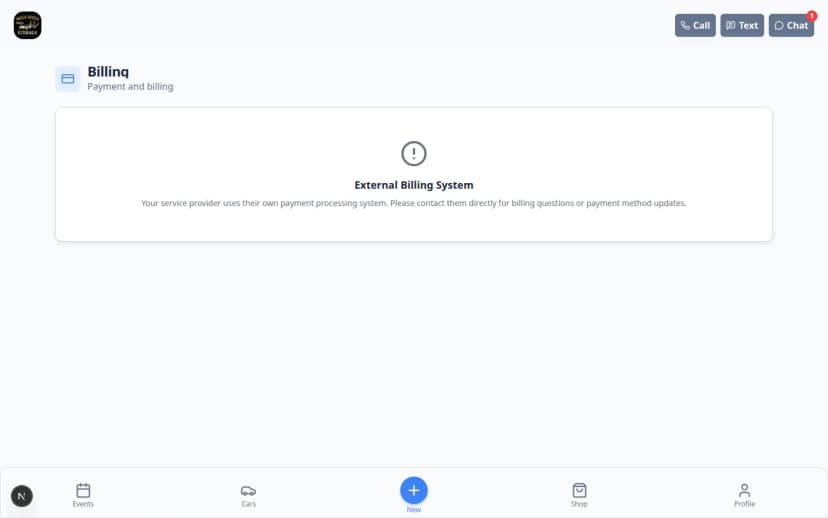
A compact floating bottom bar on phones and tablets leaves more space for cars, events, billing, and documents—with clearer active tabs from your website settings.
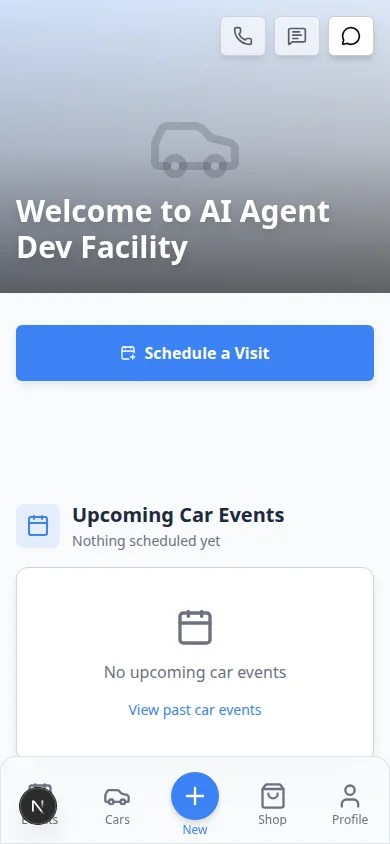
Collectors read invoices and car photos on their phones—the navigation should not eat half the screen.
Why we built it
The customer portal bottom bar is now a compact, floating dock on phones and small tablets (hidden on desktop-width layouts). Tabs use clear active styling, optional primary actions with your brand color, and safe-area padding so content on Cars, Events, Schedule, Shop, Billing, and Documents can scroll with less chrome. Focused flows—onboarding, schedule booking, and community channels—still hide the bar so forms stay full-screen. Facilities configure which tabs appear in Customize the customer mobile app.
Who it is for
- Facilities whose customers live in the portal on iPhone or Android home-screen shortcuts.
- Teams that added Shop, Billing, or Documents tabs and need them readable on small screens.
- Staff previewing layout changes in Website & customer app before publishing.
What you can do
- Give customers a shorter bottom nav with glass-style tabs instead of a tall permanent footer.
- Highlight the current section so owners know whether they are on Home, Cars, or Billing.
- Reorder or trim footer items in settings—preview matches what customers see on mobile.
- Pair with Customizable customer portal pages for page content above the dock.
How it fits your day
Publish an updated footer with Cars and Billing only, send a portal invite, and ask a customer on their phone to confirm they can reach invoices without excessive scrolling past navigation chrome.
Get started
Open Settings → Website & customer app, adjust Bottom navigation, use the mobile preview, then sign in as a test customer on a phone to verify tabs and content spacing.
Questions about this update?
Book time with our team or browse the rest of the changelog.