

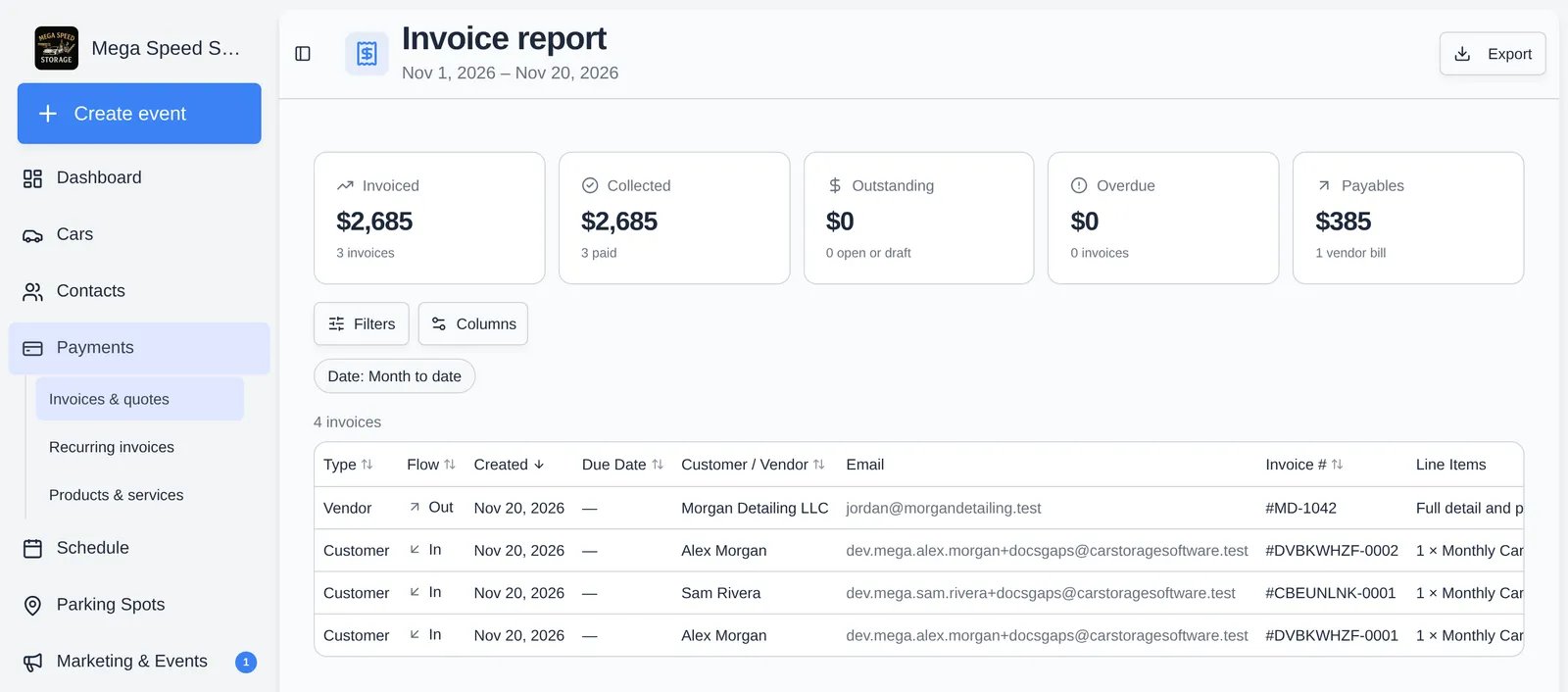
How the totals are worked out
The range filters by the date an invoice was created, not the date it was paid. An invoice made on Nov 28 and paid on Dec 3 belongs to November. The totals always match the rows you can see, so they change when you set the Status filter.
Things that are left out or worth knowing:
- Voided invoices stay in the table (status Void) but never count toward a tile.
- Three kinds of Stripe housekeeping invoices are hidden entirely: the monthly invoices that are auto-voided for a paused plan, the $0 placeholder created when a plan is scheduled to start later, and duplicate drafts that were voided before anyone was billed.
- A plan invoice with a target billing date uses that date as its due date, so it is not flagged overdue early.
- A draft waiting on a customer to choose how to pay shows the status Waiting for customer. It is not counted in Outstanding while it waits.
- Dates and day boundaries use your facility’s time zone, not your browser’s. Set it in General settings.
Filters
Click Filters to set:- Date: Month to date (default), This month, Last month, Next month, Last 3 months, Year to date, or Custom (both a start and an end date are required).
- Status: All, Paid, or Unpaid. Unpaid means open, draft, waiting for customer, submitted, under review, or approved. Uncollectible and void invoices are in neither Paid nor Unpaid; they show under All.
Columns
Use Columns to hide, show, or drag columns into a new order. Your choice is saved to your own login and also drives the export.
For vendor bills, Subtotal, Invoice Total, and Amount Due are the bill amount, Tax and fees are zero, and Payment Method reads Paid out once paid.
Export
Click Export (top right) to download an Excel file namedinvoices-report-<start>-to-<end>.xlsx with one sheet, Invoices.
- It contains the rows currently shown (after your Status filter and sort) and only the columns you have visible, in your order.
- Below the table it adds a summary block: Total Invoiced, Collected, Outstanding, Vendor Payables, Total Invoices, Customer / Vendor counts, Overdue, and Overdue Amount.
- Money and dates are written as formatted text (for example
$895.00), not numbers, so Excel will not sum them until you convert them. Use Data > Text to Columns, or aVALUEformula after removing the$and commas.