

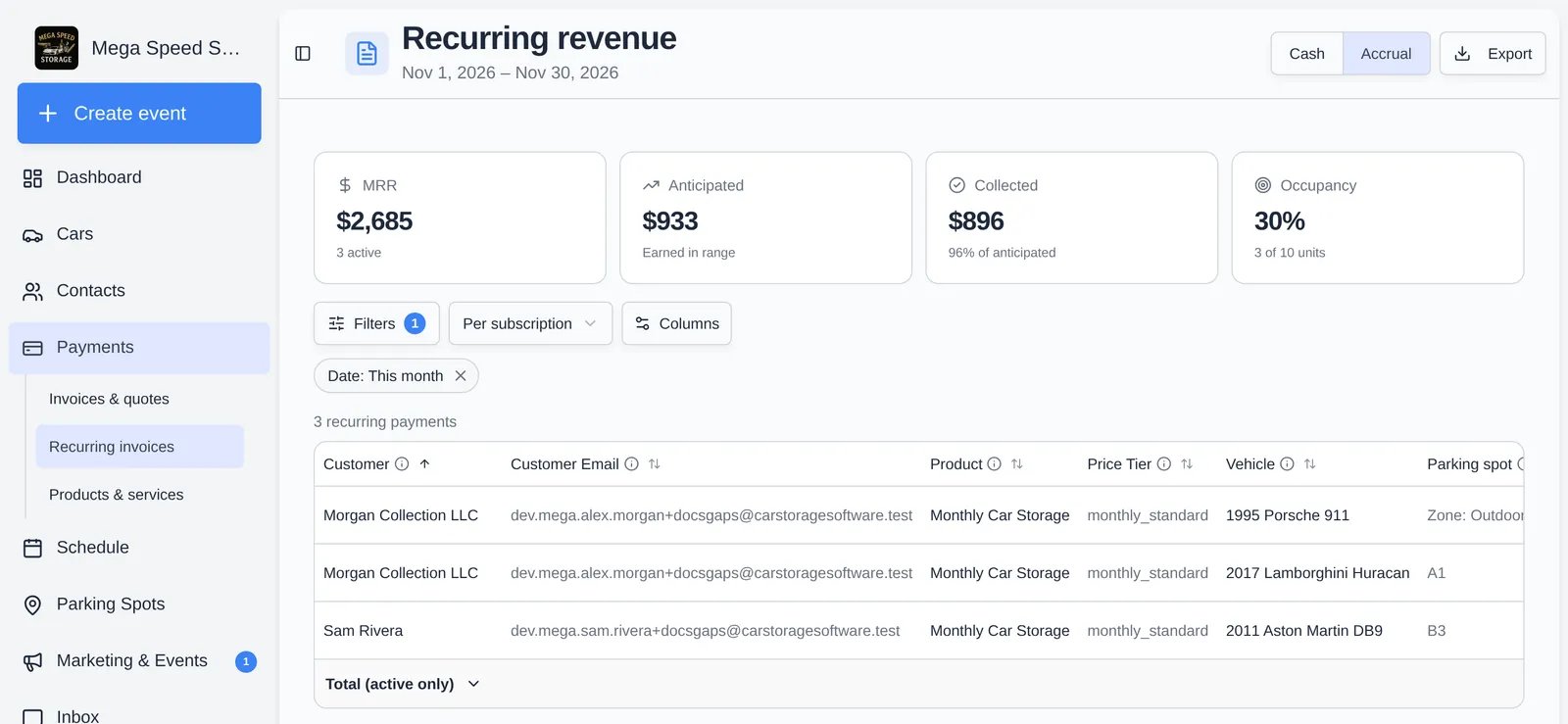
The four tiles
Occupancy uses each plan’s contract rate against today’s list price, so a plan sold at a discount lowers it even when every unit is full.
Cash and accrual
The Cash / Accrual switch (top right) changes how Anticipated and Collected are counted. MRR and Occupancy do not change. The app remembers your choice in this browser.
A worked example: a plan bills $931.64 on Nov 20 for the month to Dec 20.
- Cash, range Nov 1 to Nov 30: the Nov 20 billing is in range, so Anticipated is $931.64.
- Accrual, same range: Nov 20 to Nov 30 is about 10 of the plan’s 30 days, so Anticipated is about $311.
- Accrual, range Dec 1 to Dec 31: the plan still earns the days from Dec 1 to Dec 20 from that same charge, while the Dec 20 charge earns its first days.
- A plan counts when it was created before the end of the range and was not canceled before the start.
- Anticipated includes an estimate of tax and processing fee, so it can be higher than what a customer is actually charged if tax or fees are not set up. Collected is rent only, which is why it can read a few percent lower.
- Dates and day boundaries use your facility’s time zone.
Rows, filters, and sorting
- Rows (next to Columns): Per subscription is one row per plan. Per line item splits plans that have several products into one row per product. Per car gives one row per vehicle, the classic rent roll. A line covering two cars becomes two rows with its amounts split evenly, and units with no car linked show Unassigned.
- Filters has a Date range (Month to date, This month, Last month, Next month, Last 3 months, Year to date, Custom) and a filter for every column: tick values to include for text columns, or set a minimum and maximum for money and number columns. Hidden columns can still be filtered. Click Apply filters; Reset clears them.
- With column filters on, the tiles and the Total row recalculate for the rows left.
- The last row of the table shows the Total (active only). Open its menu to switch to Average.
- Click a header to sort. Hover the info icon on a header for its definition.
Columns
Use Columns to hide, show, or reorder. The saved layout also drives the export.Export
Click Export (top right) for an Excel file namedrecurring-revenue-report-<cash or accrual>-<start>-to-<end>.xlsx with one sheet, Recurring Revenue.
- It has the rows shown (after filters, in the current row mode) and your visible columns, using the Cash or Accrual figures you have selected.
- Under the table it adds Revenue Basis, Anticipated Revenue, Collected Revenue, Economic Occupancy, Current Street-Rate Monthly Capacity, Total Active Monthly Recurring Revenue, Average Active Monthly Recurring Revenue, Active Recurring Payments, and Total Recurring Payments.
- Money is written as formatted text such as
$895.00, so convert it before summing in Excel.